Momentum Dash
Review 2026
A browser extension that replaces your new tab with a beautiful productivity hub. Pomodoro timer, background sounds, task tracker, AI notes — all in one click away from your work.
- 38-component background sounds mixer
- Pomodoro timer + site blocking
- Task integrations (Todoist, Asana…)
- Ask AI for notes & brainstorming
- 3M+ users · Free tier available
No credit card required · Free tier permanent
🌅 What Is Momentum Dash?
Momentum Dash is a browser extension — a “skin” for your new tab page — that turns the otherwise blank screen into a full-featured productivity dashboard. With over 3 million users and featured in Tim Ferriss’ Tools of Titans, The Wall Street Journal, and Apple’s WWDC, it has established itself as the premier focus browser extension.
Every time you open a new tab, Momentum greets you with a beautiful daily landscape, a motivational quote, the time, weather, and your main focus task for the day. Over time, this becomes a powerful ritual that anchors the start of each work session.
Level: Light. Momentum is not a hardcore blocker. It works best for people who are self-motivated and need a focus environment, ambient sound, and habit reminders — not enforced restrictions. If you need hard blocks, pair it with FocusMe.
Key Features at a Glance
Pomodoro + Focus Mode
25-min timer with soft website blocking and your main task displayed front and center.
Background Sounds
15 categories, 38 components in Custom Mode. Volume-adjustable sub-components per scene.
Task Tracker
Create tasks directly or integrate Asana, Todoist, Trello, ClickUp, GitHub & more (Plus).
Metrics Counter
Track custom KPIs (gym sessions, books read) or connect Fitbit/Strava for health data.
Notes + Ask AI
Quick note capture with AI summarization, brainstorming, and text editing built in (Plus).
World Clocks
Add any time zone to your dashboard. Essential for remote teams working across continents.
🖥️ Dashboard & Main Menu
The registration is quick and frictionless. After installing the extension, you get a brief guided tour and immediately your new tab becomes the Momentum interface.
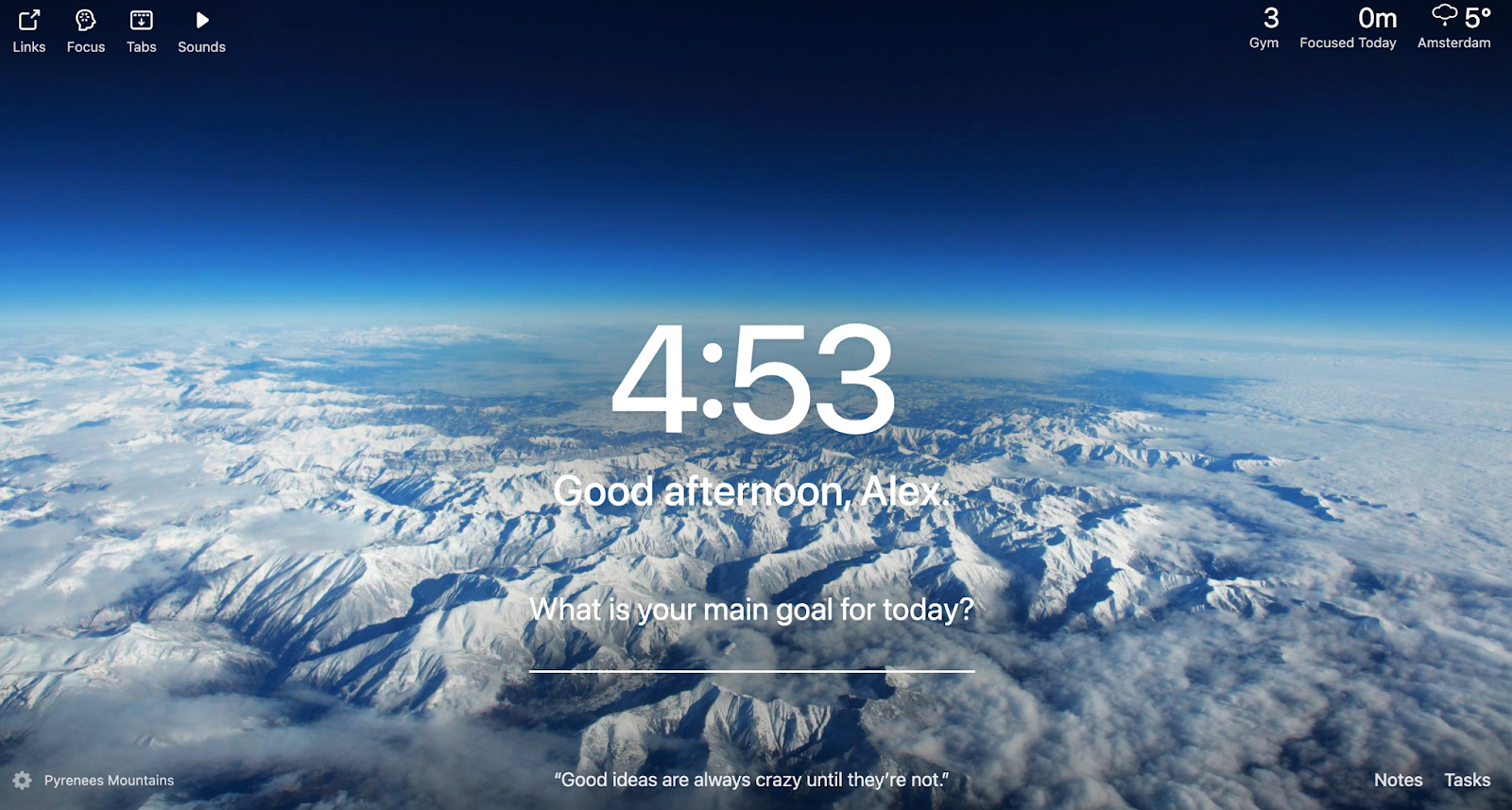
📸 The Momentum Dash new tab — daily background, time, quote, focus task, and quick links to all features
The main menu consists of links to features (Todo, Focus, Sounds, Notes, Metrics), your primary task for the day prominently displayed, plus time, weather, and a daily motivational quote. It’s clean and the lack of clutter is intentional.
Feature links — everything accessible with one click from the new tab
One honest limitation: no dedicated search bar on the default free view. The free version does include search (Google/Bing selectable), but it’s less prominent than the standard browser new tab. A minor friction for search-heavy workflows.
Because the background photo and quote change daily, opening a new tab becomes a small ritual. Over weeks, this builds a psychological anchor: “opening the browser = starting focused work.” A subtle but real behavioral design element.
⏱ Focus Mode & Pomodoro Timer
When you activate Focus Mode, Momentum starts a 25-minute Pomodoro timer and connects it to your primary task for the day. Any attempt to navigate to a blocked site category shows you a reminder screen displaying exactly what you were supposed to be working on.

Focus Mode — reminder screen when trying to visit a blocked site
⚠️ Soft blocking: The block screen can be dismissed with one click. You can proceed to the distraction site immediately after seeing the reminder. For people who need hard enforcement, Momentum will not stop them — it only creates friction and reminds them of their intent. This is the extension’s main weakness for serious procrastination.
Blocking Categories Setup
The default five categories are social media, entertainment, news, shopping, and email. You can add any custom site to existing groups or create entirely new category groups:
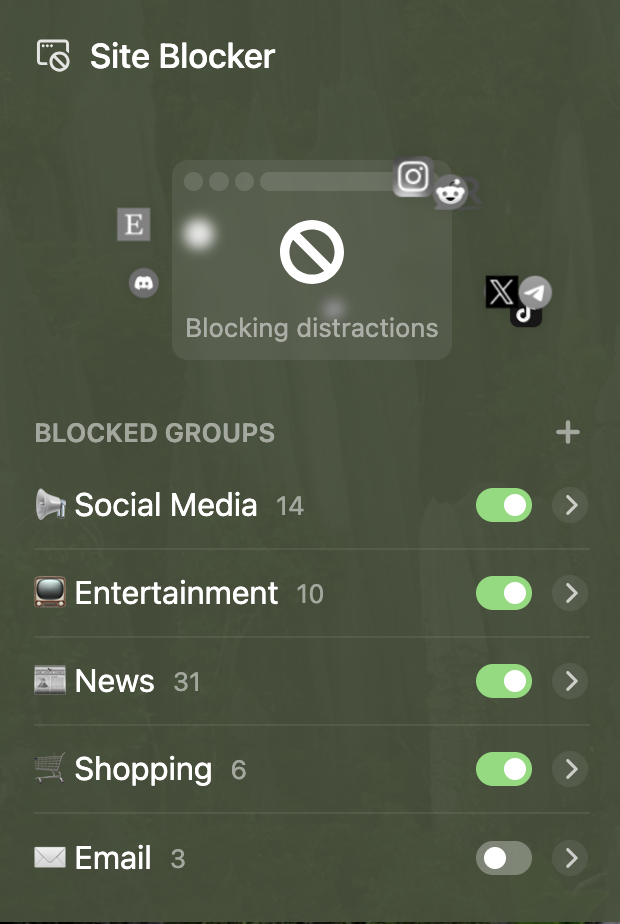
Default 5 blocking categories

Add custom sites or create new categories
🎵 Background Sounds — The Standout Feature
This is where Momentum Dash genuinely earns its place. The background sounds implementation is the best available in any productivity tool — full stop. If you’ve ever lost 20 minutes trying to find the right “focus playlist” on Spotify, you’ll immediately understand why this matters.
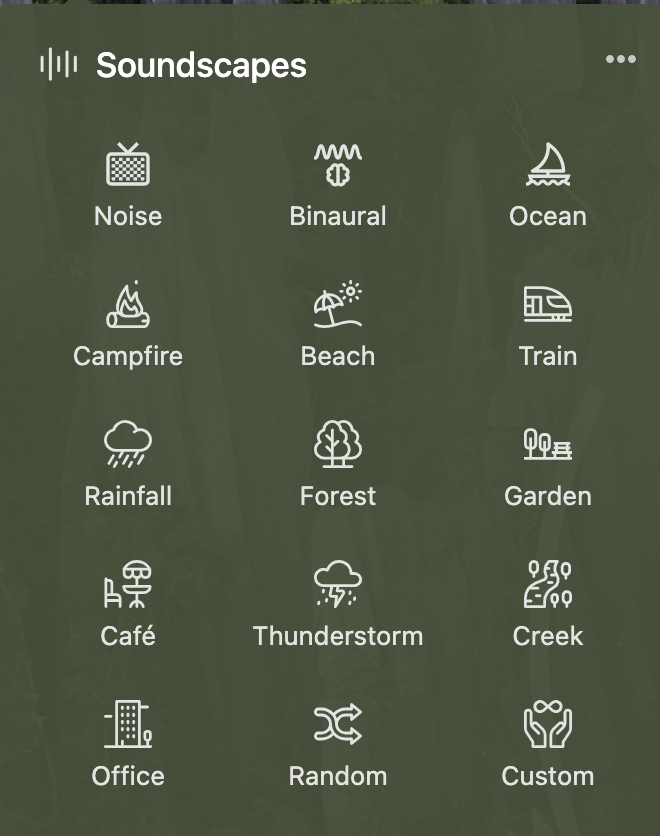
📸 15 sound categories available — from Coffee Shop to Thunderstorm to Fireplace
Sub-component Volume Control
Each sound category contains sub-components. The Garden scene, for example, is made of wind chimes, birdsong, and wind — each with its own individual volume slider. You craft your precise ambient environment:

Sub-component mixer — adjust each element individually (wind, birds, chimes)
Custom Mode: 38 Components
Switch to Custom Mode for full control: 38 individual sound elements you can combine in any combination. Coffee shop background + distant thunder + slow rain + light keyboard clicks — all at once, each volume-adjusted to your preference.
This feature activates automatically when you enter Focus Mode (if you’ve configured it). The value here is enormous for anyone who can’t focus in silence but finds music with lyrics distracting.
✅ Task Tracker
You can build a simple to-do list directly in Momentum, or connect your existing task manager via integrations (Plus feature).

Task tracker — create lists or connect external apps
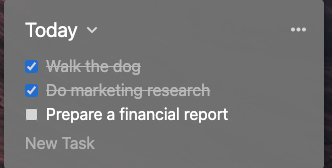
Task list in the dashboard view
The value proposition is simple: you open your browser over 80% of computer sessions. Putting your task list in the new tab means you’ll actually see it — unlike a dedicated app you have to consciously navigate to. Third-party integrations work with Asana, Basecamp, ClickUp, GitHub, Google Tasks, Microsoft To Do, Todoist, and Trello.
📊 Metrics — Custom Habit Tracker
The Metrics feature lets you track any countable habit or KPI directly on your dashboard. You can connect health apps like Fitbit or Strava for automatic sync, or create completely custom manual counters.
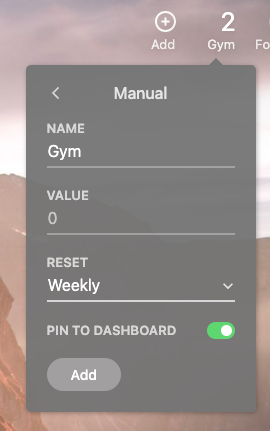
📸 Custom Metrics counter — “Gym” resets weekly, creates daily accountability
A personal example: the author tracks gym sessions for the week — counter resets every Monday. Seeing “2/4 gym sessions” on every new tab is a subtle but effective motivational reminder that doesn’t require a separate habit app.
✍ Notes & Ask AI
A lightweight note-taking panel, useful when you need to capture a thought before it evaporates. Speed is the key advantage — it’s already open in your browser, no switching required. The Plus plan adds Ask AI: brainstorm outlines, correct mistakes, summarize text, break goals into steps, all without leaving the dashboard.
The one genuine gap: no note-to-task conversion. After a meeting, when you want to quickly extract action items from your notes and push them to your task list, you have to do this manually. A “Convert to task” button would make the notes feature significantly more powerful.
💰 Momentum Dash Pricing 2026
Free
$0
forever
Daily background, to-do list, basic Focus Mode with blocking, weather, search, motivational quote. More than enough to try the concept.
Best Value
Momentum Plus
$3.33
per month ($39.95/year)
Custom background sounds (38 components), Pomodoro customization, 3rd-party task integrations, Ask AI, custom Metrics, World Clocks, Site Blocker, tab stashing, extra themes.
At $3.25/day (the author’s original framing of $0.10/day), Momentum Plus is the cheapest productivity tool in this category. If it helps you stay focused for even 15 minutes longer per day, the cost-benefit is obvious.
⚖️ Pros & Cons
✅ What We Like
- Best background sounds of any productivity tool
- 38-component Custom Sound Mode — unique feature
- Everything in one click from the new tab
- Daily background + quote builds a focus ritual
- Solid Pomodoro with task integration
- 3rd-party task integrations (Asana, Todoist, Trello…)
- Custom Metrics tracker (Fitbit/Strava sync)
- Ask AI for notes (Plus)
- 3M+ users — mature, reliable product
- Free tier is genuinely useful
- Only $39.95/year (~$0.10/day)
- New Site Blocker feature added
✗ What We Don’t Like
- Soft blocking — one click bypasses any restriction
- Browser-only — no mobile app, no phone sync
- Doesn’t affect desktop apps or games
- No note-to-task conversion
- Replaces new tab — loss of search-as-start-page workflow
- No cross-device productivity stats
- Not suitable if phone is your main distraction source
🆚 Momentum vs Competitors
| Feature | Momentum | FocusMe | RescueTime | StayFree |
|---|---|---|---|---|
| Browser new tab | ✓ Core feature | ✗ | ✗ | ✗ |
| Background sounds | ✓ Best-in-class | ✗ | ✗ | ✗ |
| Hard site blocking | ⚠ Soft only | ✓ Bypass-proof | ⚠ Focus sessions | ⚠ Basic |
| Productivity analytics | ✗ | ✗ Broken | ✓ Best-in-class | ⚠ Basic |
| Pomodoro timer | ✓ Good | ✓ Best-in-class | ✗ | ✗ |
| Mobile support | ✗ None | ✗ None | ⚠ Android/limited iOS | ✓ Android-first |
| Annual price | $39.95/yr | $29.99/yr | $78/yr | Free / ~$29.99 |
👤 Who Is Momentum Dash For?
✅ Great choice if you…
- Do most of your work through a browser
- Struggle to find focus music (the sounds are worth the price alone)
- Want a daily ritual to anchor focused work sessions
- Have mild procrastination, not severe compulsive distraction
- Already use Pomodoro technique
- Want task manager integration without switching apps
- Need World Clocks for remote team coordination
✗ Look elsewhere if you…
- Need hard, bypass-proof site blocking (use FocusMe)
- Your main distractions are on your phone (use StayFree)
- Want productivity analytics and usage tracking (use RescueTime)
- Spend significant time in desktop apps outside the browser
- Have serious compulsive procrastination that soft reminders won’t stop
For browser-primary knowledge workers: Momentum Dash (new tab, sounds, Pomodoro) + RescueTime (analytics). These two have zero overlap and work perfectly together. Add FocusMe if you need hard blocking on top.
❓ FAQ
🏆 Final Verdict
Momentum Dash earns an 8.0/10 — highly recommended for anyone whose work is browser-centric and who has mild rather than severe focus challenges.
The background sounds feature alone is worth the $39.95/year for people who struggle to find appropriate ambient audio. The new tab ritual, Pomodoro integration, and task consolidation make it a genuinely useful daily tool. The soft blocking is the principal limitation and an honest design choice — Momentum trusts users, which isn’t always what procrastinators need.
Momentum Dash — 8.0/10
Best background sounds · Soft blocking · Free tier available
Install Momentum Dash Free →Free forever · Plus $39.95/year · Cancel anytime